Designing an Inbox & Form Experience
I designed the stats screen, helped establish the foundation for the form design and navigation bar, and contributed to redesigning the Comm Program’s brand.
Project Context
About Company
The Comm Program is an internal tool for managers and staff to handle project approvals. One of it’s main features are CSWs and Orders requests made by managers or staff that are related to tasks, roles, promotions, and more. These are the features I focused on redesigning.
(Client)
Balance of Nature
(My Role)
UX & UI Designer
(Project Type)
Employee Stat Reporting Software
(Industry)
Work Management
(Team)
UX/UI Designer (2), Front-End Developer (2), Back-End Developer (3), Business Analyst (1), Quality Assurance (1), Product Owner (3)
About Product
The Comm Program is an internal tool for managers and staff to handle project approvals. One of it’s main features are CSWs and Orders requests made by managers or staff that are related to tasks, roles, promotions, and more. These are the features I focused on redesigning.
The Users
Internal team members, and executives/mangers who need transparency over ongoing initiatives, status updates, and performance indicators.
Business Requirements
Increase productivity by giving managers and staff workers that ability to easily view their CSW’s and submit CSW’s and Order forms. We want to close the feedback loop and improve team outcomes by making sure they see the CSW’s and work on them ASAP.
What I Did
Helped with rebranding the Comm Program to a more modernize experience, layout, feel, and support future feature expansion.
Design a clear and intuitive sidebar navigation to improve discoverability and reduce cognitive load.
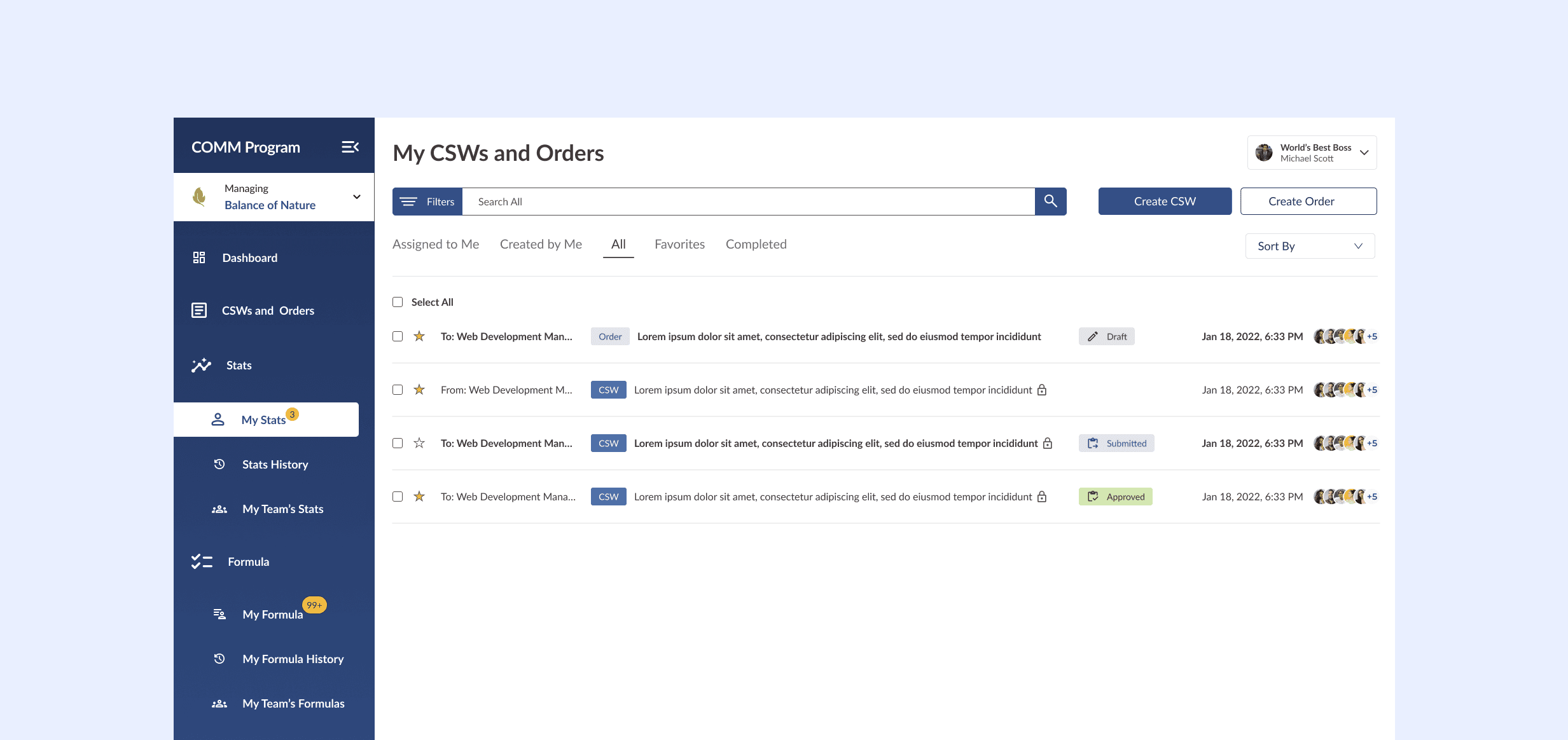
Designed the "My Stats" Screen using an inbox-style with tags and priority indicators to improve visibility and task management.
Design the Create & Review Order forms to reduce friction, minimize errors, and improve completion efficiency
Discovery & Research
Kick-off Meeting
I met with stakeholders, the product owner, business analyst, lead developer, and other UX/UI designer to get aligned. We reviewed progress, discussed communication and stat-tracking challenges, clarified objectives, and defined success. I left with a clear understanding of the program’s gaps, the team’s support, and documentation for next steps.
Understanding the Project
I began by understanding the problem space through stakeholder meetings, user interviews, and surveys. I created an affinity map to help me see themes and patterns.
(In the affinity map, I organized insights by color: red sticky notes for pain points, green for positive feedback, and yellow for suggestions.)
Finding the Problem
What Is The problem?
After gathering research and analyzing feedback, one issue kept surfacing. User were losing track of CSW forms, the CSW forms are what are used to approve task and other important stuff. This gap wasn’t just an inconvenience, it was a breakdown that directly affected accountability, project progress, and team morale.
Other Findings
While talking with stakeholders, managers admitted they often didn’t know where to find certain CSW’s, or they felt buried under too much information. Team members, on the other hand, felt like their progress or requests were not being acknowledged, which led to frustration and missed opportunities for improvement.
Exploring Solutions
Sketches And Wireframes
With the research insights in mind, I began sketching and wireframing ideas to simplify the user experience. Early concepts was an inbox style screen that organized CSWs with clear tags and priority indicators, making urgent items stand out immediately. The intention was to move away from the scattered, reactive communication patterns of the old system and replace them with a tool that felt proactive, structured, and easy to act on.
(This is what the first set of lo-fi wireframes started to looked like.)
(For the lo-fi wireframes, I focused on layout, space between elements, and information.)
(This is what the mid-fi wireframe, before usability testing, started looking like.)
(After several iterations, the mid-fi wireframes for the stats screen began to take shape, showcasing a more polished and user-friendly design with clearly displayed tags and the information users want to see.)
Design System & Forms
(While designing the inbox and forms, I was simultaneously developing the first version of the Comm Program’s design system.)
Design & Iteration
Hi-Fidelity Designs
The product owners approved the mid-fi wireframes for the inbox and form. Before moving into hi-fi designs I wanted to get some feedback so I can revise the designs if needs, so I conducted some usability testing.
Usability Testing
After the designs were in hi-fidelity ready, we did some usability testing. We asked participants to complete common tasks, such as reviewing a CSW, responding to an alert, or approving an order. We observed where friction occurred.
What worked: Users quickly understood the layout and appreciated the inline validation in the forms.
What didn’t work: The layout could be simplified further, and each CSW could include more context to clearly explain what it’s about.
Iteration
Using these insights, I refined the designs by:
Simplifying the inbox screen even more.
Adjusted the card layout for a cleaner, more scannable overview.
Provide more information on the CSW, without the user having to click anything.
(After a few refinement stages, the stat screen started looking more complete.)
(For the lo-fi wireframes, I focused on layout, space between elements, and information.)
(Once the stats screen was finalized, I began exploring how to incorporate the form and came up with a light-box solution.)
(As part of my task I was assigned to work on the form layout, here is the layout that I landed on based on research and user testing)
Handoff
It’s Time
After finalizing the design conducting usability testing, I handed off all screens, design system specs, and interaction notes to the developers. I worked closely with them to make sure everything was implemented as intended and stayed on standby for any questions along the way.
(A look into the hand-off file.)
(The hand-off file included components that made it easy for developers to build for all states.)
(Every major feature and screen included notes explaining its purpose and functionality.)
(As part of my task I was assigned to work on the form layout, here is the layout that I landed on based on research and user testing)
Results
Impact & Learnings
Impact
The redesign of some of the key Comm Program features improved efficiency and engagement across multiple departments. Managers could quickly scan prioritize urgent CSWs, staff workers felt like they were being seen and heard. Redesigned forms reduced errors and streamlined workflows, saving time for both staff and managers. Establishing a design system ensured consistency across screens and laid the foundation for future scalability.